
Garmin Pilot
GarminWeather
2.7896.00 Reviews
- Version
- 26.2.0
- Installs
- 500.00K
- Age Rating
- Everyone
Screenshots
Our Review of Garmin Pilot
 Analysis by Appyee
If you’re someone who loves flying or is training to become a pilot, you’ve probably heard about Garmin Pilot. I recently took it for a spin, and let me tell you, it’s quite the co-pilot! Whether you’re a seasoned pro or just starting out, this app is worth checking out. So, buckle up and let’s dive into what makes this app soar.
What Free Access Means in Practice
The first thing I’d weigh up is the cost. Garmin Pilot is a free weather app to install, and the app is marked as free, but that does not mean every part of the experience is included at no cost. In-app purchases are listed from $74.99 to $109.99 per item, so I would treat the free download as a chance to inspect the app rather than assume it provides a complete aviation workflow without payment.
That distinction matters more here than it does with a casual forecast app. Pilots may be choosing tools for planning and cockpit use, where missing a capability they rely on is not a small inconvenience. Before building a routine around it, I’d check what the free experience lets me do and whether any paid item is needed for the particular workflow I want. The listed purchase range is useful context, but it does not tell me which purchase suits a given pilot, so I would avoid budgeting on the assumption that one item unlocks everything.
Garmin is the developer, and the app has been available since March 27, 2012. Its current version is 26.2.0, and it requires Android 11 or later. It is rated for Everyone, though that age label is not a substitute for aviation training or a judgement about whether someone is ready to use a flight tool. I also take its average rating of 2.7 from around 2,600 ratings as a reason to try it carefully rather than as proof that it will fit every device or flying routine. It has over 500,000 installs, which suggests meaningful reach, but popularity alone does not establish cockpit suitability.
First Impressions: A Cockpit in Your Pocket
From the moment I launched Garmin Pilot, I was impressed by its sleek design. It’s like having a mini cockpit right in your pocket. The app opens up with a clean, user-friendly interface, which is crucial when you need to access information quickly mid-flight. Everything is laid out clearly, making it easy to navigate through various features.
For me, the sensible way to judge any electronic flight tool is not by how capable it appears while sitting at home, but by whether its layout still makes sense when attention is divided. I’d spend time learning where the information I use most often appears before relying on it during a flight. A screen that feels straightforward on the ground can still demand too much attention in a busy moment, so familiarity is part of the value, not an optional extra.
Flight Planning Made Easy
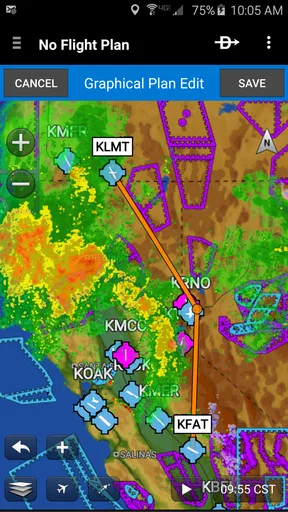
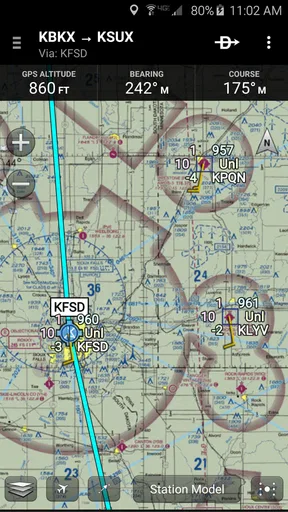
One of the first things I noticed was how intuitive the flight planning feature is. You can set up your entire flight plan with just a few taps. The app provides detailed information about your route, including weather conditions, which is a lifesaver for any pilot. No more flipping through endless charts; it’s all right there on your screen.
In a practical routine, I’d use a planned route as a starting point for a deliberate preflight review, not as a substitute for one. Entering a destination is only one part of deciding whether a trip makes sense; the pilot still needs to consider the aircraft, their own limits, and the conditions that matter for that flight. A route display is most useful when it helps me spot questions early, such as whether a weather picture deserves closer attention or whether I should rethink the timing.
A useful habit is to review the route and its weather together, rather than treating the map and forecast as separate chores. That makes it easier to notice when the conditions along the way deserve more attention than those at either endpoint. It also gives me a natural point to pause and verify my assumptions before departure. The convenience of having information together is real, but it should support a pilot’s decision-making rather than make the decision for them.
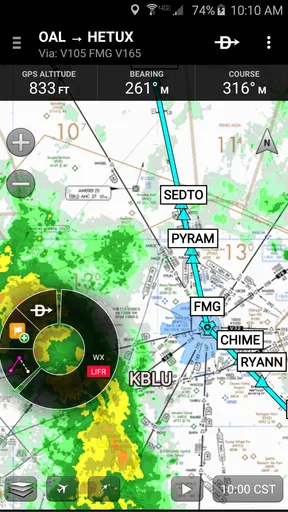
And the weather overlays? Absolutely clutch. You can see real-time weather updates, which helps in making informed decisions. It’s like having a meteorologist at your beck and call. The app integrates current and forecasted weather, making it a breeze to avoid turbulence or unexpected weather changes.
Weather changes quickly, so I would not read an overlay as a promise that the conditions will remain as shown. I’d use the display to form and revisit a picture of the route, then keep checking information through the appropriate stages of planning and flight. This is especially important when a trip crosses areas with differing conditions: a single glance can make a broad pattern easier to understand, but it cannot remove the need to interpret what that pattern means for the aircraft and the pilot.
Navigation and Tracking
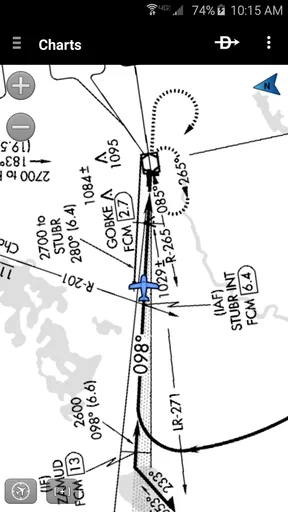
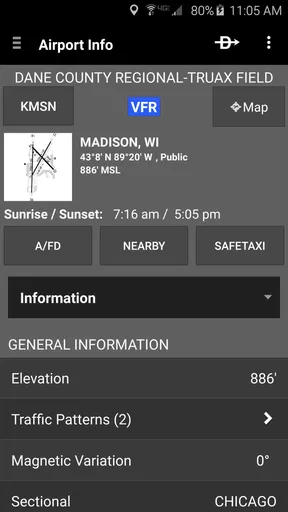
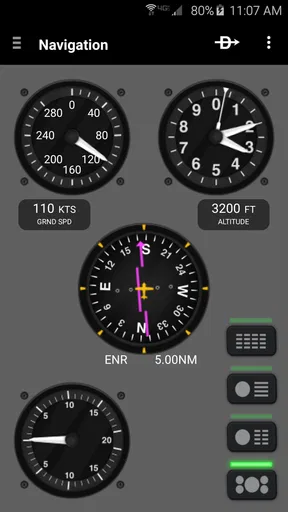
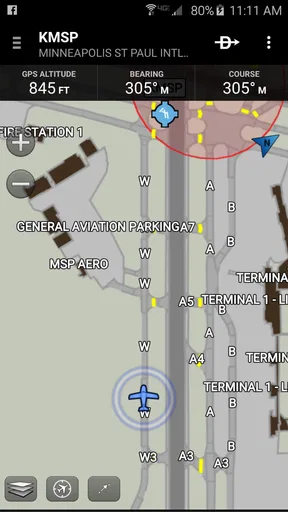
The navigation tools are another highlight. The moving map is incredibly responsive and detailed. It’s almost like having your personal GPS but for the skies. You can track your flight in real-time, and it’s fascinating to see your journey unfold on the map. Plus, the app provides comprehensive information on airspaces, airports, and even fuel prices at different stops. Talk about planning ahead!
That mix of map and route information is more valuable to me when I use it before the flight to identify points that need a closer look. A quick scan for airspace and possible stops can shape the plan before I’m occupied with flying. The fuel-price information may also help when comparing possible stops, but I would treat it as one consideration among several rather than choosing a diversion on price alone. Convenience is useful; the operational reasons for a stop still come first.
Compared with a general-purpose weather app, this is a more aviation-centred way to think about conditions: weather sits alongside route and flight context instead of being the whole experience. A typical phone forecast is fine when I only want to know whether to bring a coat or change a walk. It is not a like-for-like replacement for flight planning and navigation. On the other hand, if I am not flying and just need everyday local weather, a simpler forecast app is likely quicker and less demanding to learn.
In-Flight Features
Once airborne, the app continues to impress. The in-flight features are designed to minimize workload, which is crucial when you’re cruising at 30,000 feet. The app offers a split-screen mode, allowing you to keep an eye on multiple data points simultaneously. Need to check your flight plan while monitoring weather updates? No problem!
Split-screen can save repeated switching, but there is a trade-off: showing more at once can make each panel feel busier. I’d decide on the arrangement during quiet preparation, when I can work out which information belongs together and which deserves its own clear view. The goal is not to pack the screen with everything available. It is to make the next relevant item easy to find without turning the display into another distraction.
For a realistic example, imagine preparing for a short trip to visit family at another airport. Before leaving, I could review the route, check the weather picture, and note where airspace or a possible stop needs attention. During the flight, a moving map and a deliberately chosen split-screen view could keep the plan and changing conditions in sight. If the weather picture shifts or the route no longer feels appropriate, the app can help me see the context; the pilot remains responsible for deciding what to do next. That is the kind of support I value: useful information in one place, without confusing convenience with authority.
Another cool feature is the logbook integration. It automatically logs flights and tracks hours, which is a huge time-saver. No more manual entries; it’s all digital and seamless. I found this particularly useful for keeping track of my flying hours without any hassle.
Even when automatic logging reduces paperwork, I would make a habit of checking the resulting entries instead of assuming every flight record is complete and correct. A logbook is valuable precisely because pilots may need to rely on its history later, so a quick review after a flight is a sensible safeguard. If a pilot already keeps records another way, it is also worth deciding which record will be treated as the reference copy; maintaining two systems without a regular comparison can create avoidable uncertainty.
Safety Features: A Pilot’s Best Friend
Safety is paramount in aviation, and Garmin Pilot doesn’t disappoint. The app includes several safety features that every pilot will appreciate. For instance, the terrain and obstacle alerts give you peace of mind, especially during low-altitude flights. These alerts are timely and precise, ensuring you have ample time to react if needed.
I would treat alerts as prompts to pay attention, not as a guarantee that every hazard has been anticipated or that a warning will always arrive with enough time to resolve a problem. That distinction is important with any electronic aid: it can contribute to awareness, but it cannot replace sound planning, training, or the pilot’s wider scan. I’d learn how the alerts behave and what they mean before depending on them, and I would avoid letting a reassuring screen reduce attention to the environment around the aircraft.
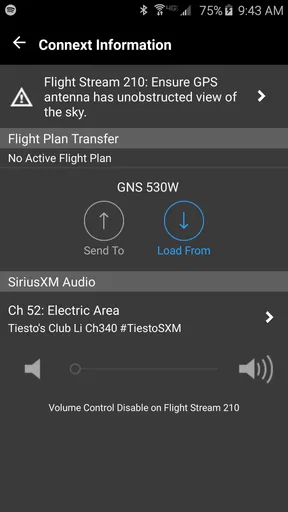
Not to mention, the app’s emergency features, like nearest airport locator and glide range ring, are crucial in case of unexpected situations. It’s like having a safety net while you’re up in the air.
Those tools are most useful when their purpose is understood before an emergency, not discovered while dealing with one. I’d learn where the relevant information appears and think through how it fits into my training and procedures. A displayed nearest airport or range ring can help frame a situation, but it does not decide whether an airport is suitable or remove the need to respond according to the conditions at hand. That careful distinction is why I see digital safety aids as backup support, not a substitute for preparation.
Learning Curve and Usability
For those new to aviation or digital flight tools, you might wonder about the learning curve. Honestly, Garmin Pilot does a fantastic job of easing users into it. The app offers tutorials and support, making it accessible even for beginners. It’s designed to be intuitive, so you’re not overwhelmed by all the features. Plus, the community around it is pretty supportive, so help is never far away.
Still, “accessible” should not be confused with effortless. Someone new to aviation may find that a well-organized screen is easier to approach than a pile of separate references, but the concepts behind flight planning, airspace, and weather still take study. I would learn the app alongside proper instruction and use practice sessions to become comfortable with its layout. A student pilot can benefit from seeing connected information in one place, while a newcomer who only wants a basic forecast may find the aviation vocabulary and choices unnecessary.
If I were comparing it with another aviation planning app, I would focus less on a feature checklist and more on how naturally it fits the way I prepare and fly. I’d compare the information I need, the clarity of the map, and whether the paid items align with my intended use. A familiar workflow can be more valuable than a longer-looking menu of tools, especially when I need to find something quickly. If another app already supports my established routine better, switching simply because Garmin Pilot has a broad feature set would not be a compelling reason on its own.
Final Thoughts: Worth the Investment?
So, is Garmin Pilot worth the investment? In my opinion, absolutely. It’s packed with features that enhance safety, efficiency, and enjoyment for pilots. Whether you’re flying a small Cessna or a larger aircraft, having this app is like having an extra pair of eyes and ears in the cockpit.
I’d make that recommendation most confidently to a pilot who will use its aviation-focused planning, mapping, weather, and record-keeping tools regularly, and who has checked that the free access and any relevant in-app purchase fit their needs. For that person, bringing several parts of a flying routine together may justify the time spent learning the interface. The strongest value is not simply having a lot on screen; it is being able to use the information in a considered workflow.
For a casual flyer, an occasional passenger, or someone who only wants a forecast for daily life, I’d skip it and choose a simpler weather option. For a pilot already comfortable with a different flight-planning system, I’d compare the actual workflow before changing over, rather than assuming a new app will improve things automatically. The average rating is modest, so I would also try it on my own device and judge the experience personally instead of treating its reputation as a guarantee.
Of course, it’s not the only flight planning app out there, but its combination of usability and features sets it apart. It’s more than just an app; it’s a toolkit for modern aviators. If you’re serious about flying or just want to make your flights smoother and safer, give Garmin Pilot a try. You might just find it’s the co-pilot you’ve been looking for.
Verdict
Strengths of Garmin Pilot
- Comprehensive aviation weather updates.
- Intuitive flight planning interface.
- Real-time traffic and terrain alerts.
- Integrated flight logging system.
- Customizable dashboard for quick access.
Limitations of Garmin Pilot
- Steep learning curve for beginners.
- Requires subscription for full features.
- Occasional sync issues with devices.
- Limited offline functionality.
- High battery usage during flights.
Other Releases by Garmin
View All
Navionics® Boating
Maps & Navigation2.9

Garmin Explore™
Maps & Navigation3.5

Garmin Drive™
Auto & Vehicles3.8

Garmin Golf
Sports4.7
Similar Picks in This Category
View All
Weather - By Xiaomi
Xiaomi Inc.4.1

Weather & Radar Forecast
WetterOnline4.8

Weather
OneLouder Apps4.6

AccuWeather: Weather Radar
AccuWeather3.6

The Weather Channel - Radar
The Weather Channel4.6

1Weather Forecasts & Radar
OneLouder Apps4.3
Frequently Asked Questions
What features does Garmin Pilot offer for flight planning?
Garmin Pilot provides comprehensive flight planning tools, including route planning, weather information, and fuel calculations. Users can access real-time weather updates, create and save flight plans, and receive alerts for potential hazards. The app also integrates with Garmin GPS devices for seamless navigation.
Is Garmin Pilot compatible with both Android and iOS devices?
Yes, Garmin Pilot is available on both Android and iOS platforms. It offers a similar user experience across devices, allowing pilots to switch between platforms without losing functionality. However, users should ensure their devices meet the app's system requirements for optimal performance.
Does Garmin Pilot offer offline capabilities?
Garmin Pilot supports offline usage by allowing users to download maps, charts, and weather data in advance. This feature is especially useful for flights in areas with limited connectivity. Pilots can access critical information even without an active internet connection, ensuring safety and efficiency.
What subscription options are available for Garmin Pilot?
Garmin Pilot offers several subscription plans, including monthly and annual options. Each plan provides access to different features, such as advanced weather tools and premium charts. Users can choose a subscription based on their specific needs and can upgrade or cancel at any time through the app.
How user-friendly is Garmin Pilot for beginners?
Garmin Pilot is designed with a user-friendly interface, making it accessible for both novice and experienced pilots. The app includes intuitive navigation, tutorial videos, and a comprehensive help section. Beginners can easily learn to use the app, while advanced users can take advantage of its robust features.
